Free AI for All: Visual Evidence
Authenticated screenshots and an evidence map for CUHK's connected AI-literacy ecosystem.
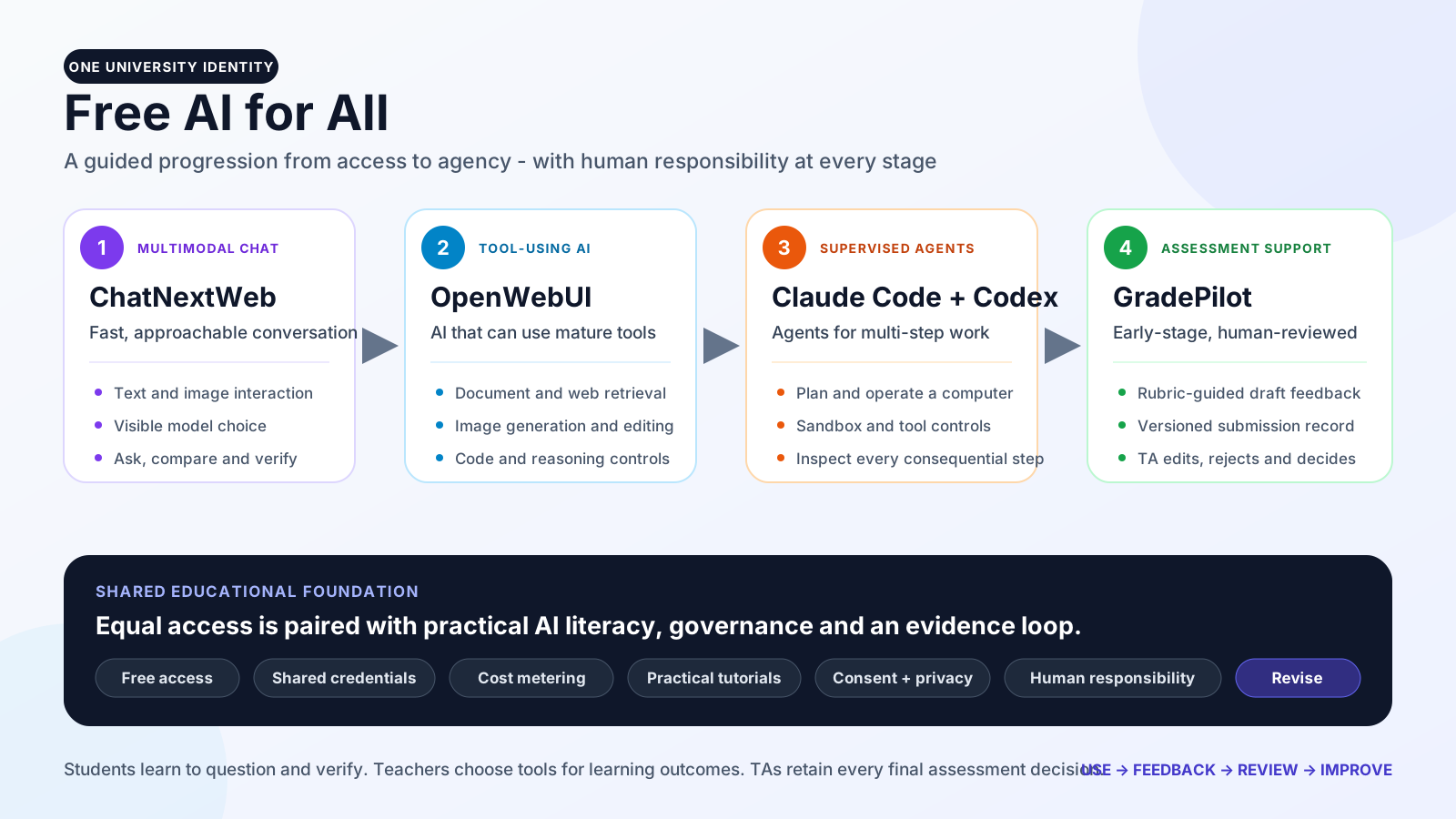
Free AI for All is CUHK’s connected educational AI ecosystem. With one shared identity, students, teachers and teaching assistants move from multimodal chat, to AI that uses tools, to supervised agents, and finally to human-reviewed assessment support. The design pairs free access with practical AI literacy: asking better questions, checking outputs, managing cost, supervising actions and retaining responsibility for the result.
Evidence note. These images were captured from authenticated demo environments on 14 July 2026. Credentials and real student data are not shown. The GradePilot captures use a demo submission; no score or feedback field was changed or saved. GradePilot is an early-stage prototype, and no pending submission is presented as a completed or AI-approved grade.
1. ChatNextWeb: a simple route into multimodal AI
The first stage gives users an approachable conversation surface before they progress to more complex tools. The captured profile is the teacher-facing demo. Its interface brings together conversation history, reusable prompts, image input, model controls and a familiar chat box.
Model choice is visible rather than hidden. Users can compare systems from several providers and discuss why different models give different answers, where each may fail, and when a lower-cost model is sufficient.
2. OpenWebUI: AI that can use tools
The second stage moves beyond conversation. The authenticated OpenWebUI prompt bar exposes native web search, image generation, reasoning, voice input and file or extension controls. The selected-model description also surfaces price and data-handling information, reinforcing that capability, privacy and cost should be considered together.
The searchable catalogue groups models by provider and service tier. This makes model selection explicit and supports the project’s customised cost metering and weekly budget controls rather than defaulting every task to the most expensive option.
OpenWebUI also renders technical notation directly in a teaching conversation. In this short statistical-mechanics example, the user asked for two display equations and a compact explanation; the result preserves the mathematical structure instead of returning source markup or a code block.
A second prompt demonstrates multiple tools inside one response. Native web search finds the exact SI values of Planck’s constant and the speed of light from official sources; the Code Interpreter then multiplies them and returns the result in a structured table. The visible tool trace, source domains, calculation and final values allow a learner to inspect the path as well as the answer.
Image work is similarly iterative. The first prompt generated a clean educational illustration of a double-slit experiment. The result was then supplied to the image-edit workflow with explicit preservation and change instructions: retain the apparatus and perspective, move to a white background, change the beam to magenta, keep the gold fringes and add a red directional arrow.
The working authenticated image capture uses OpenWebUI’s available google/gemini-3.1-flash-image alias. The requested preview-labelled OpenRouter route, google/gemini-3.1-flash-image-preview, was also tested twice in ChatNextWeb, but its current adapter returned a JSON parsing error; it is therefore not represented here as a successful run.
3. Claude Code and Codex: supervised agents in a working environment
The third stage places agents inside an authenticated JupyterLab environment. Users can work with files, notebooks and terminals while keeping the agent’s actions visible. This turns AI literacy from answer checking into process supervision: reviewing plans, tool calls and changes before accepting them.
The same environment also provides Claude Code. Its interface exposes agent, tool and permission controls; the screenshot is a capability check, not an autonomous task. Students and educators can therefore compare agent behaviour within one supervised workspace.
4. GradePilot: early-stage, human-reviewed assessment support
GradePilot connects course materials, assignments, submission and review. The student-facing demo shows structured homework cards, problem access, due dates and a clear submission route. This creates the workflow into which rubric-guided draft feedback can be introduced without bypassing the teaching assistant.
Each submission keeps a visible status and version history. The demo item below is still pending, which accurately reflects the prototype stage. GradePilot may draft rubric-guided feedback and a provisional grade, but a teaching assistant must inspect, edit or reject that draft and retains every final decision.
The TA-authenticated grading screen makes final responsibility concrete. It presents an overall score, sub-question rubric fields, written feedback, the submitted source and a rendered-PDF pane together. “AI Fill” is an optional draft action beside a separate “Save” control; the teaching assistant remains in the review loop and decides what, if anything, becomes part of the grade.
What the evidence demonstrates
| Award area | Evidence on this page |
|---|---|
| Innovation | A coherent progression from multimodal chat to tool use, supervised agents and human-reviewed assessment, joined by shared access and practical AI literacy. The project does not claim to have built the underlying foundation models. |
| Impact and potential impact | The interfaces reduce entry barriers while supporting distinct student, teacher and TA workflows. Application records report more than 300 active users across at least ten Physics and Statistics courses, approximately 100 daily users, more than 40 billion tokens served and over 100 written feedback responses. |
| Responsible depth | Visible model choice, price and data-handling information, institutional metering, inspectable tool traces, agent sandbox and tool controls, versioned submissions and retained TA authority create repeated opportunities to question, verify and intervene. |
The 2024-25 survey records reported that more than 75% of respondents found the service easy to use and more than 80% reported improved learning. Those figures are reported outcomes; the screenshots above demonstrate the actual learning and review surfaces through which the programme operates.